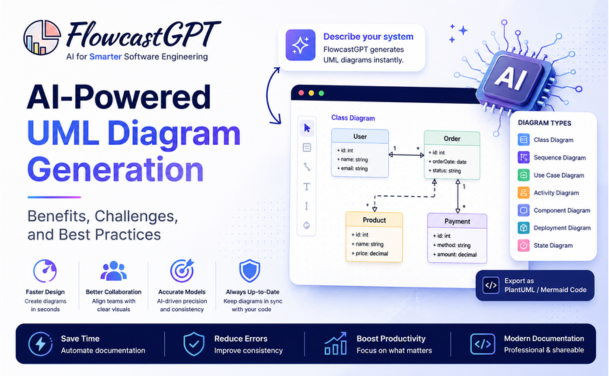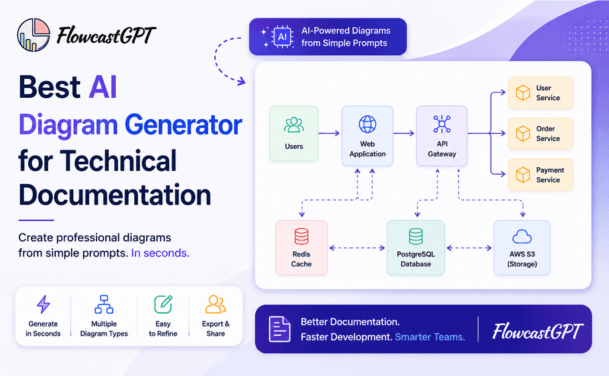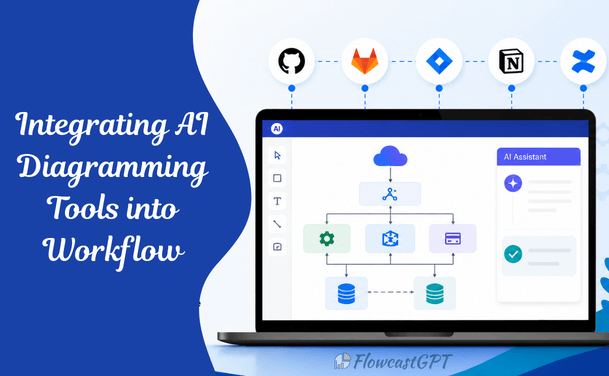
AI diagramming tools are software platforms that use artificial intelligence to automatically generate, edit, and update visual diagrams including flowcharts, system architecture maps, UML diagrams, ER diagrams, and more from natural language prompts or structured inputs. In 2026, leading tools include FlowcastGPT, Miro AI, Lucidchart, Eraser DiagramGPT, Mermaid Chart, and Excalidraw with MCP support. They integrate with tools like Jira, Confluence, Slack, GitHub, and Notion, enabling teams to embed live diagrams directly into their existing workflows.
There is a universal experience shared by developers, product managers, architects, and business analysts alike: you need to explain a system, a process, or a decision and you open a diagramming tool to a blank, white canvas. Twenty minutes later, you have half a flowchart, three misaligned boxes, and a growing sense that you should have just written a paragraph instead. AI diagramming tools have fundamentally changed this experience. In 2026, the best tools in this space can take a plain-English description of your system, process, or idea and generate a structured, editable, professional diagram in seconds. More importantly, they integrate with the tools your team already uses Jira, Confluence, Slack, GitHub, Notion, VS Code making diagrams a living part of your workflow rather than a one-off export that goes stale the moment you share it. This guide covers everything you need to know to make AI diagramming tools a genuine part of how your team works: which tools are leading the space in 2026, how to choose the right one for your use case, how to integrate them into common workflows, and the practical steps to get started today.
Most teams still create diagrams manually and that creates problems.
Over time:
Integrating AI diagramming tools solves this by embedding diagram creation directly into your workflow, ensuring diagrams stay relevant and useful.
Choosing the right tool is only the first step. The real value comes from integrating AI diagramming into your team's existing workflows so that diagrams are created consistently, updated automatically, and accessible in the tools your team already uses. Here is a practical step-by-step guide for the most common workflow contexts.
Before choosing a tool, define how you plan to use AI diagramming.
Common use cases include:
Tip: Start with one high-impact use case, such as system architecture.
Not all tools are built for the same purpose.
When evaluating tools, consider:
To get real value, AI diagramming must be part of your development process.
Integrate with:
Example:
When code is updated -> diagram updates automatically
This ensures diagrams reflect the actual system and not assumptions.
For complex systems, visual tools alone are not enough.
Combine AI with diagram-as-code tools.
Benefits:
AI can generate Mermaid code which auto-generates diagrams.
Diagrams should live where your documentation lives.
Connect with:
Why it matters:
AI can auto-generate both diagrams and documentation together.
AI tools are most powerful when used collaboratively.
Features to enable:
This helps:
Stay aligned on system design.
Automation is where AI truly shines.
Examples:
This eliminates outdated diagrams completely.
To scale across teams:
Benefits:
Read: How QA Teams Can Use AI Diagram Generators
AI generates architecture diagrams from:
Visualize:
Understand:
Map:
AI-generated diagrams can be structurally plausible but factually incorrect they invent connections, misrepresent data flows, or omit critical components. The solution is not to distrust AI generation, but to treat the generated diagram as a first draft that requires review by someone with domain knowledge, not as a finished artifact.
Even with AI assistance, diagrams go stale when teams don't update them as systems evolve. The most effective mitigation is to use diagram-as-code tools (Mermaid, D2, Excalidraw + MCP) where the diagram lives alongside the code and updating the diagram is part of the same workflow as updating the code and not a separate documentation step.
Teams that adopt multiple AI diagramming tools for different use cases can end up with architecture diagrams in Miro, sequence diagrams in Mermaid, ER diagrams in Lucidchart, and process flows in Eraser all disconnected. Define a team standard: one tool per diagram category, with a clear owner for each. Document the standard in your engineering wiki.
Enterprise teams must evaluate the data handling policies of cloud-based AI diagramming tools before entering sensitive system architecture or business process information into prompts. Miro, Lucidchart, and Eraser all offer enterprise security tiers with data residency controls and SOC 2 Type II compliance. For highly sensitive architectures, consider self-hosted options (Excalidraw is open source and self-hostable) or ensure your enterprise plan includes appropriate data isolation guarantees.
Establish a team norm that all AI-generated diagrams require at least one review by a person with direct knowledge of the system or process before being published to documentation or shared with stakeholders. The AI saves the drawing time; the human provides the accuracy check.
Not a replacement for architects.
Best of both worlds.
Avoid manual updates.
Test before rolling out organization-wide.
Also read: From Idea to Diagram in 30 Seconds: A Complete Guide
The next evolution of AI diagramming includes:
The blank canvas problem is solved. Nowadays, there is no reason for a developer, architect, product manager, or business analyst to spend hours manually arranging shapes and arrows to explain a system or process. AI diagramming tools generate accurate, editable, professional diagrams in seconds from plain-English descriptions. But the real opportunity is not just faster diagram creation, it is making diagrams a living part of how teams work. Diagram-as-code tools that live in version control, MCP-connected diagrams that update alongside code changes, and deep integrations with Jira, Confluence, Slack, and GitHub mean that for the first time, the gap between how a system works and how it is documented can be genuinely closed. The teams that will gain the most from AI diagramming in 2026 are not the ones that adopt every tool, they are the ones that choose one or two tools that fit their workflow, integrate them deeply, and establish clear team standards for when and how diagrams are created and maintained. Start with one diagram type, one tool, and one integration. The rest will follow.
For engineering teams, Mermaid is free with no account required for basic use, natively supported by GitHub, and usable with any LLM that can write Mermaid syntax. For visual canvas use, Miro's free tier allows up to 3 editable boards with AI features. Excalidraw is free and open source.
Yes, increasingly so. Tools with MCP support (Excalidraw + MCP via Claude Code) can read a codebase and generate architecture diagrams. InfraSketch and Eraser can generate system diagrams from code descriptions and requirements. Mermaid Chart's AI can take a database schema file and generate an ER diagram. This capability is advancing rapidly in 2026.
For structure and completeness, AI-generated diagrams are often better than first-draft manual diagrams because the AI applies consistent formatting, correct notation, and does not skip components. For accuracy (are all the connections and data flows correct?), human review remains essential. The typical workflow is AI generation for the initial draft, human review and refinement for accuracy.
Yes. Lucidchart, Miro, Gliffy, and draw.io all offer native Confluence integrations with live diagram embedding. Mermaid diagrams can be embedded in Confluence via the Mermaid Chart Confluence app. Eraser diagrams can be shared as embed links in Confluence pages.
Both are diagram-as-code languages where diagrams are defined as text files and rendered as images. Mermaid has broader ecosystem support (native GitHub rendering, more plugins, more LLM training data). D2 offers more advanced layout control and aesthetic options, particularly for complex architecture diagrams. For most teams starting with diagram-as-code, Mermaid is the safer starting point due to ecosystem breadth.
Lucidchart has a direct Salesforce integration that generates org charts and process flows from Salesforce data. Miro integrates with Salesforce via Zapier for workflow automation around diagram creation and updates. Workato can automate diagram updates in Lucidchart or Miro when Salesforce records change.