As software systems, cloud architectures, business processes, and product workflows become increasingly complex, visual communication has never been more important.
For years, teams relied on traditional drag-and-drop diagramming tools to create flowcharts, architecture diagrams, UML models, and process maps. Then came Diagram-as-Code tools allowing diagrams to be created using text and managed alongside source code.
Now a third category is emerging: AI-powered diagramming tools.
These tools generate diagrams from natural language prompts, documents, code snippets, screenshots, or existing diagrams—dramatically reducing the effort required to create and maintain visual documentation.
This raises an important question:
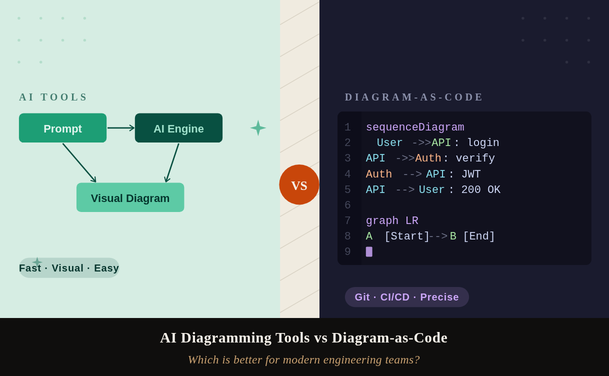
Should teams use AI diagramming tools or Diagram-as-Code solutions?
The answer depends on your goals, team structure, documentation practices, and long-term maintenance needs.
In this guide, we'll compare both approaches across usability, collaboration, scalability, maintenance, version control, and AI readiness.
Read: Key Considerations When Choosing an AI Diagramming Tool for Complex System Architectures
AI diagramming tools use large language models and generative AI to reduce or eliminate manual diagram construction. You describe what you want — in plain language, by uploading a codebase, or by pasting a requirements document — and the tool produces a structured visual.
Examples include:
Modern AI diagramming tools fall into a few categories:
You type "draw a microservices architecture with an API gateway, auth service, and product catalog" and the tool produces an annotated, styled diagram automatically. Tools like Eraser.io, Whimsical AI, and Miro AI operate this way. The output is typically drag-and-drop editable.
Tools like CodeToFlow and GitHub's Copilot integrations can analyze your actual source code — classes, imports, function call chains — and generate diagrams that reflect your real system, not your imagined one. This is arguably the most powerful application of AI in this space.
Traditional tools like FigJam, Miro, and Lucidchart have bolted on AI assistants that can auto-generate starting templates, suggest diagram structures, and summarize content. These sit somewhere between pure AI tools and traditional editors.
Key insight: AI diagramming tools optimize for speed of creation. They lower the barrier to producing a first draft dramatically — from 30 minutes to 30 seconds in many cases.
Also read: How QA Teams Can Use AI Diagram Generators
Diagram-as-Code (DaC) is the practice of defining diagrams using a text-based, markup-like syntax that is then rendered into a visual. The source file — a plain text document — is the canonical artifact, not the rendered image.
The paradigm was popularized by PlantUML in the early 2010s and has since expanded to include Mermaid.js, Structurizr, D2, Graphviz, and several others. Each uses its own syntax but shares the same philosophy: treat your diagrams the way you treat your code.
Popular Diagram-as-Code tools include:
Diagram-as-Code allows diagrams to live alongside code repositories and be managed using Git workflows.
The appeal is straightforward: DaC integrates naturally into existing engineering workflows. You write it in your editor, store it in version control, render it in your docs site (GitHub natively renders Mermaid in Markdown files), and update it when the system changes — without opening a separate tool.
Key insight: Diagram-as-Code optimizes for long-term maintainability and workflow integration. The cost is an upfront learning curve and lower visual flexibility.
Let's systematically compare both approaches across the dimensions that matter most to engineering teams.
| Dimension | AI Diagramming Tools | Diagram-as-Code | Winner |
|---|---|---|---|
| Speed to first draft | Seconds to minutes via natural language prompts | Minutes to hours; requires learning syntax | AI Tools |
| Version control | Proprietary formats; limited Git integration | Plain text — native Git, full diff support | DaC |
| Visual quality & styling | Polished, customizable, pixel-level control | Functional but constrained by renderer themes | AI Tools |
| Accuracy to actual system | Depends on prompt quality; can hallucinate structure | Exactly what you write; no inference errors | DaC |
| CI/CD and automation | Rare; most tools lack programmatic APIs | Excellent; renderers can run in build pipelines | DaC |
| Collaboration | Real-time multiplayer editing in most tools | Async via PRs; no live collaboration natively | AI Tools |
| Non-technical stakeholders | Accessible; no syntax knowledge needed | High barrier; requires code literacy | AI Tools |
| Docs-as-code integration | Typically exports images; breaks the chain | Native in MkDocs, Docusaurus, GitHub, GitLab | DaC |
| Cost | Freemium to $20+/user/month for AI features | Mostly free and open-source | DaC |
| Learning curve | Low; intuitive for most users | Moderate; syntax varies by tool | AI Tools |
| Complex layout control | High; drag, resize, annotate freely | Limited; layout is auto-generated by engine | AI Tools |
| Long-term maintenance | Diagrams rot when tool changes pricing/format | Text files last forever; no vendor lock-in | DaC |
A dead tie — which is not a cop-out, but the honest answer. The right choice depends entirely on which dimensions matter most to your team.
Check out: Integrating AI Diagramming Tools into Your Existing Design Stack
A.) Faster Diagram Creation
This is the biggest advantage.
AI tools allow users to create diagrams in seconds rather than minutes or hours.
Instead of:
You simply describe the system.
Example:
"Generate a user registration workflow."
The AI handles the visualization automatically.
Best For
B.) Lower Technical Barrier
Most business users do not know Mermaid or PlantUML syntax.
AI removes this requirement entirely.
Users can create diagrams using plain English.
This dramatically expands access across organizations.
C.) Better for Brainstorming
During workshops and planning sessions:
AI diagramming tools make iteration effortless.
Generate → refine → regenerate.
This workflow is difficult to achieve with manual diagram coding.
D.) Ideal for Cross-Functional Teams
AI diagramming works well when:
all need to contribute.
No specialized diagram language is required.
A.) Version Control
This is Diagram-as-Code's biggest advantage.
Since diagrams are stored as text files:
Diagram history becomes transparent.
A simple code change immediately shows how the architecture evolved.
B.) Documentation That Stays Current
One of the biggest problems in engineering is documentation drift.
Static diagrams become outdated quickly.
Diagram-as-Code reduces this problem because diagrams live alongside source code.
Many teams update diagrams as part of:
C.) Better for Large Systems
Complex architectures often require:
Diagram-as-Code scales better than visual editing tools.
Large architecture maps remain manageable through text-based editing.
D.) Automation and CI/CD Integration
Diagram-as-Code can be integrated into:
Diagrams can be regenerated automatically during deployments.
Also Check: From Idea to Diagram in 30 Seconds: A Complete Guide
Interestingly, AI and Diagram-as-Code are no longer competitors.
They're increasingly working together.
Large language models are exceptionally good at generating:
from natural language descriptions.
Example workflow:
This combines:
Rather than declaring a universal winner, here's a decision framework based on real-world scenarios.
| Use AI Tools | Use Diagram-as-Code |
|---|---|
| Stakeholder presentations: When you need a polished diagram for a board deck or client presentation, AI tools produce presentation-ready output faster. | Living architecture docs: System docs that live in your repo and must stay in sync with code changes belong in DaC — PR reviews catch diagram drift. |
| Sprint retrospectives & workshops: Real-time collaborative sessions with mixed technical/non-technical teams need drag-and-drop, not syntax memorization. | CI/CD pipeline diagrams: Infra and pipeline diagrams auto-generated from config files via DaC stay accurate automatically as pipelines evolve. |
| Rapid prototyping & exploration: When brainstorming a new architecture, AI tools let you sketch and discard multiple approaches in minutes. | Open-source documentation: DaC files in public repos let contributors update diagrams via PRs, just like any other contribution. |
| One-off explainers: If a diagram will be created once, shared, and never updated, AI tools are faster and the lack of version control doesn't matter. | Regulated/audit environments: Compliance-heavy teams need a full audit trail of diagram changes. Git history on DaC files provides this natively. |
One underappreciated factor is diagram rot — the tendency for diagrams to become outdated as systems evolve. AI-generated diagrams in proprietary tools rot fastest because there's no structural incentive to update them, and they're not in the developer workflow loop. DaC diagrams rot more slowly because they live alongside the code they describe, and updating them is part of the same PR that changes the system.
The team that treats diagrams as code artifacts tends to have more accurate, more trustworthy documentation — even if individual diagrams look less polished than their AI-generated counterparts.
Check: How to Integrate AI Diagramming Tools into Your Workflow
AI-generated diagrams can:
Always validate results.
Business stakeholders often struggle with syntax-driven workflows.
AI generates diagrams.
It does not replace architectural expertise.
A beautiful diagram today is useless if it becomes outdated next month.
Increasingly, the winning strategy is not AI Diagramming or Diagram-as-Code.
It's both.
A modern workflow often looks like:
This approach combines:
Several modern platforms are already moving in this direction by generating editable diagram code directly from prompts.
No. AI is increasingly enhancing Diagram-as-Code rather than replacing it. AI often generates Mermaid, PlantUML, or D2 syntax automatically.
For long-term architecture documentation, Diagram-as-Code is generally stronger due to version control and maintainability.
Absolutely. Mermaid remains one of the most common outputs generated by AI diagramming systems because it integrates well with developer workflows and documentation platforms.
AI diagramming tools are usually better because they prioritize speed, collaboration, and ease of use.
Yes. Modern LLMs can generate Mermaid, PlantUML, and D2 syntax directly from natural language descriptions.
If your team is primarily product, design, or non-technical, and diagrams are communication artifacts rather than engineering deliverables, AI diagramming tools like Eraser.io or Whimsical are the pragmatic choice. They're fast, beautiful, and require no syntax knowledge.
If your team is engineering-led, ships docs alongside code, runs CI/CD pipelines, and cares about diagram accuracy over the life of a system, Diagram-as-Code — specifically Mermaid for lightweight use and D2 or Structurizr for architecture documentation — is the correct long-term investment.
For most modern software teams, the answer is deliberately both: AI tools for the messy, collaborative, explorative work, and DaC for the canonical, maintained, version-controlled record. The teams that treat these as competing choices are missing the point. The teams that use them as complementary layers are winning.
AI diagramming tools win on speed, polish, accessibility, and live collaboration. They are the right choice for presentations, workshops, and rapid exploration.
Diagram-as-Code wins on maintainability, accuracy, version control, CI/CD integration, and long-term cost. It's the right choice for living documentation and engineering-owned artifacts.
Use LLMs to generate DaC syntax and you get most of the benefits of both: the ease of natural language input with the discipline of code-based output. This is where the best teams are heading in 2026.
Diagram rot is the real enemy. Whichever approach you choose, the tool that keeps diagrams in the path of least resistance for your developers is the one that will actually produce accurate, up-to-date documentation.