Software systems are becoming increasingly complex. As applications evolve into distributed, cloud-native, AI-powered, and microservices-based architectures, documenting system design has become more important—and more time-consuming—than ever before.
Unified Modeling Language (UML) diagrams have long been the industry standard for visualizing software architecture, workflows, and system interactions. However, creating UML diagrams manually often requires significant effort, technical expertise, and continuous updates throughout the software development lifecycle.
Artificial Intelligence is changing that.
Modern AI-powered UML diagram generation tools can transform natural language prompts, user stories, code snippets, API specifications, and technical documentation into professional UML diagrams within seconds. This enables architects, developers, product managers, and business analysts to spend less time drawing diagrams and more time building software.
In this article, we'll explore how AI-powered UML diagram generation works, its benefits, common challenges, best practices, and why it's becoming an essential capability for modern software teams.
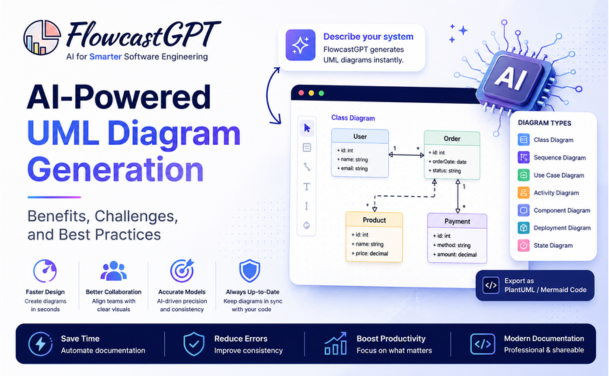
AI-powered UML diagram generation uses Large Language Models (LLMs), Natural Language Processing (NLP), and machine learning to automatically create UML diagrams from various inputs.
Instead of manually designing every relationship and component, users can simply describe a system in plain English, upload source code, or provide technical documentation.
For example:
"Create a class diagram for an e-commerce platform with Customers, Orders, Products, Payments, and Shipping."
Within seconds, AI can generate an accurate UML model that developers can refine rather than creating it from scratch.
Check out: FlowcastGPT New Features - Generate Process Documents & Code Scaffolding with AI Capabilities
Understanding which UML diagram types AI handles well — and which remain more challenging — is essential for evaluating AI UML tools and setting appropriate expectations for generated output.
Class Diagrams: Class diagrams are the most commonly generated UML type and the one where AI capability is most mature. A class diagram shows the static structure of a system: the classes, their attributes and methods, and the relationships between them (association, aggregation, composition, inheritance, realization). AI generates class diagrams effectively from natural language system descriptions, from object-oriented code in any major language, and from entity definitions in requirements documents. The primary accuracy challenge is relationship multiplicity — specifying exactly how many instances of one class are associated with instances of another — which requires domain knowledge that is not always inferrable from the description alone.
Sequence Diagrams: Sequence diagrams show how objects interact in time-ordered sequence — the messages they send, the responses they receive, and the conditions under which different flows occur. AI generates sequence diagrams from process descriptions, from API interaction documentation, and from system flow specifications. Multi-loop and multi-condition sequences are the most challenging to generate correctly, as they require the AI to correctly model conditional logic and iteration at the interaction level.
Use Case Diagrams: Use case diagrams represent the functional requirements of a system from the user's perspective — what actors interact with the system and what functions (use cases) they can invoke. AI generates use case diagrams effectively from user story collections, requirements documents, and functional specification text. The simplicity of the use case notation (compared to class and sequence diagrams) makes this one of the more reliable generation targets.
Activity Diagrams: Activity diagrams model workflows and business processes — the sequence of activities, the conditions that determine which path is taken, and the responsibilities assigned to different swimlane participants. AI generates activity diagrams from process descriptions, workflow specifications, and business process documentation. The overlap between activity diagram semantics and flowchart conventions means that AI tools trained on both diagram types produce particularly accurate activity diagram output.
State Machine Diagrams: State machine diagrams model the lifecycle of an object — the states it can be in, the transitions between states, and the events that trigger each transition. AI generates state machine diagrams from lifecycle descriptions, event-driven system specifications, and protocol documentation. For complex state machines with many substates and conditional transitions, AI output accuracy decreases, and human review is more important.
Component Diagrams: Component diagrams show the physical structure of a software system — the high-level components, the interfaces they expose and require, and the dependencies between them. AI generates component diagrams from architecture descriptions, microservices specifications, and system design documents. The accuracy of generated component diagrams depends heavily on how clearly component boundaries and interfaces are defined in the source description.
Deployment Diagrams: Deployment diagrams show how software components are allocated to hardware nodes — which services run on which servers, containers, cloud regions, or devices. AI generates deployment diagrams from infrastructure specifications, DevOps configuration files (Docker Compose, Kubernetes manifests, Terraform configurations), and architecture documentation. Code-to-diagram tools that read infrastructure-as-code files to generate deployment diagrams are among the most practically useful AI UML capabilities in 2026.
Entity Relationship Diagrams: While technically adjacent to UML rather than part of the core UML specification, ER diagrams — which model database schema through entities, attributes, and relationships — are generated by most AI UML tools alongside standard UML types. AI generates ER diagrams from data model descriptions, existing schema definitions, and data dictionary documentation with high accuracy, particularly when SQL schema definitions are provided as input.
Also check: Best AI Diagram Generator for Technical Documentation
Manual UML modeling often presents several challenges:
As software delivery becomes faster, documentation must evolve just as quickly.
AI helps bridge that gap.
Modern AI platforms typically follow these steps:
AI analyzes:
The AI extracts:
The model identifies:
The system automatically creates diagrams such as:
Many tools also generate PlantUML or Mermaid code for easy editing and version control.
The most immediate and measurable benefit of AI UML generation is the reduction in time required to produce diagrams that accurately represent a system's design.
Manual UML diagram creation for a moderately complex class diagram — a domain model with 12 to 15 entities and their relationships — typically takes an experienced developer 45 to 90 minutes in a traditional diagramming tool. An AI-powered generator produces the same diagram in under two minutes from a natural language description or from the codebase itself.
AI-assisted development tools have produced productivity gains of 20 to 56% on well-scoped tasks in controlled studies (GitHub Copilot, McKinsey, and Google enterprise research), and up to 2× faster task completion on documentation-specific tasks in McKinsey's laboratory conditions. For teams that document extensively — generating UML for every sprint's design decisions, maintaining architecture documentation as the system evolves, or producing technical documentation for regulatory or audit purposes — these time savings compound materially over a project timeline.
The productivity gain is particularly significant for UML types with complex notation requirements. Sequence diagrams with multiple participants, conditional branches, and loop structures that take hours to produce manually are generated in seconds, allowing architects to validate interaction flows before implementation begins rather than documenting them after the fact.
UML's expressive power comes with significant learning overhead. The full UML 2.5 specification covers 13 diagram types with hundreds of notation elements, relationship types, and stereotype conventions. Most developers know the basics — class boxes, arrows, perhaps sequence diagram lifelines — but cannot produce technically correct advanced UML without reference materials.
AI-powered UML generation eliminates this barrier. A developer can describe a system in plain language without knowing UML notation and receive a correctly notated diagram. A product manager can describe user interactions in business language and receive a correctly structured use case diagram. A database architect can provide entity definitions in informal language and receive a properly normalized ER diagram.
This democratization of UML production has a practical organizational benefit: teams can produce architecture documentation without requiring that every team member invest in UML expertise. The AI handles the notation; the team handles the design thinking.
One of the most persistent problems in software documentation is drift: the diagram that accurately represented the system at the start of a project no longer reflects the system six months later, because the code evolved and the diagram did not. Maintaining diagram accuracy manually requires updating documentation with every code change — an effort that most development teams deprioritize in favor of building features.
AI-powered code-to-diagram generation eliminates this problem by generating diagrams directly from the current state of the code. A class diagram generated from the production codebase cannot be out of sync with the codebase — because it was generated from the codebase. An API sequence diagram generated from the current routing and controller code reflects the current API behavior, not the behavior as designed six months ago.
Visual Paradigm confirmed in early 2026 that its AI-powered UML tools now support "generating code directly from AI-enhanced UML models, improving accuracy and reducing the gap between design and implementation." The bidirectionality — code generates diagrams, diagrams generate code — is becoming the standard that eliminates the maintenance problem entirely rather than merely making it easier.
Complex software systems typically require multiple diagram types to document fully: class diagrams for structure, sequence diagrams for interaction, activity diagrams for workflows, deployment diagrams for infrastructure. Traditionally, each diagram type requires a separate authoring effort — the same system described differently for each diagram's notation and semantic focus.
AI-powered UML generation allows a single description or codebase to generate multiple diagram types simultaneously. The same system description that produces a class diagram can be used to generate a corresponding sequence diagram for the system's primary interaction flows and a component diagram for its architectural boundaries. This multi-diagram generation from a shared context ensures consistency across diagram types — the class defined in the class diagram is the same class that sends messages in the sequence diagram.
AI UML tools that support conversational refinement — where the initial generated diagram can be modified through follow-up prompts — transform the diagram from a documentation artifact into an active design tool. Architects can generate an initial class diagram, identify a structural issue, describe the change in natural language, and receive an updated diagram immediately — iterating on system design through conversation rather than through manual diagram editing.
This interactive design loop supports earlier and more frequent architectural review. When generating a diagram from a design takes seconds rather than hours, the cost of validating a design decision visually drops to near zero — enabling teams to use UML diagramming for early design exploration rather than only for final documentation.
Read: How to Create System Architecture Diagrams Using AI
AI-powered UML generation supports a wide range of scenarios:
Convert high-level requirements into architecture diagrams.
Generate UML directly from user stories.
Create diagrams from existing source code.
Understand undocumented applications before modernization.
Visualize service interactions and dependencies.
Automatically maintain architecture documentation as software evolves.
While AI offers significant advantages, organizations should also consider its limitations.
AI may misunderstand ambiguous or incomplete requirements.
Highly specialized enterprise workflows often require manual refinement.
Generated diagrams should always be reviewed by experienced architects.
Very large architectures may require incremental diagram generation.
Organizations working with sensitive codebases should evaluate deployment options and ensure compliance with internal security policies.
The more detailed the prompt or documentation, the better the generated diagram.
Treat AI-generated diagrams as a strong first draft—not the final design.
Generate diagrams for individual services or domains rather than entire enterprise systems.
Use AI-generated diagrams during:
Store generated PlantUML or Mermaid code alongside your source code to keep documentation synchronized with development.
AI is rapidly evolving from a documentation assistant into an intelligent architecture partner.
Emerging capabilities include:
As AI models become more context-aware, UML generation will become increasingly interactive, allowing teams to iterate on designs through natural conversation.
The AI UML generation tool landscape in 2026 includes 24-plus AI tools specifically identified for UML diagram generation, according to There's An AI For That's 2026 database. These range from standalone AI diagram tools to AI features embedded within established diagramming platforms.
FlowcastGPT approaches UML-adjacent diagram generation from a distinctive angle: simultaneous generation of the visual process diagram, the structured SOP document that describes the process in writing, and the code scaffold that implements the process logic — all from a single description. For teams whose primary UML-adjacent need is process and workflow documentation rather than structural software architecture, this multi-output model produces more complete documentation than any single-output diagram tool.
Eraser (DiagramGPT) has established the strongest reputation for technically accurate UML generation for software engineering teams — particularly for class diagrams, sequence diagrams, and code-to-diagram workflows. Its developer-native positioning and GitHub integration make it the natural choice for engineering teams whose diagrams need to live alongside code.
Visual Paradigm represents the most comprehensive AI-augmented traditional UML platform — a full UML modeling environment that has integrated AI generation, AI review, and AI-to-code generation as central capabilities rather than peripheral features. Its 2025–2026 updates include support for ArchiMate 4, AI chatbot-driven model creation, and bidirectional code-diagram synchronization.
Mermaid and PlantUML — the diagram-as-code standards — serve as the rendering layer for many AI UML tools and can also be used directly with LLMs. Asking any capable LLM to generate Mermaid or PlantUML syntax for a described system produces diagram code that renders in GitHub, Confluence, Notion, and dozens of other documentation platforms — without a dedicated AI diagram tool.
FlowcastGPT simplifies software design by enabling teams to create UML diagrams from natural language, technical documentation, and code with minimal effort.
With FlowcastGPT, development teams can:
Whether you're designing a new application, documenting legacy systems, or modernizing enterprise architecture, FlowcastGPT helps you create clear, consistent, and professional UML diagrams faster.
AI-powered UML diagram generation uses artificial intelligence to automatically create UML diagrams from natural language, source code, user stories, or technical documentation.
Yes. Many modern AI tools can analyze existing codebases and generate class, sequence, and component diagrams to help developers understand software architecture.
AI speeds up documentation, improves collaboration, reduces manual effort, enhances consistency, and helps teams keep diagrams up to date throughout the software development lifecycle.
Depending on the tool, AI can generate class diagrams, sequence diagrams, activity diagrams, use case diagrams, component diagrams, deployment diagrams, and state machine diagrams.
AI-generated diagrams provide an excellent starting point, but they should be reviewed and refined by software architects or developers to ensure they accurately reflect business logic and technical requirements.
AI-powered UML diagram generation is transforming the way software teams design, document, and communicate system architectures. By automating repetitive modeling tasks, AI enables developers and architects to focus on solving complex engineering problems while maintaining high-quality, up-to-date documentation.
Although AI doesn't replace architectural expertise, it significantly accelerates the modeling process, improves collaboration, and supports modern Agile and DevOps workflows. As organizations continue adopting AI-assisted development, automated UML generation will become an essential part of building scalable, maintainable, and well-documented software systems.
For teams looking to streamline architecture design and documentation, FlowcastGPT provides an intelligent, AI-powered approach to generating professional UML diagrams quickly, accurately, and efficiently.