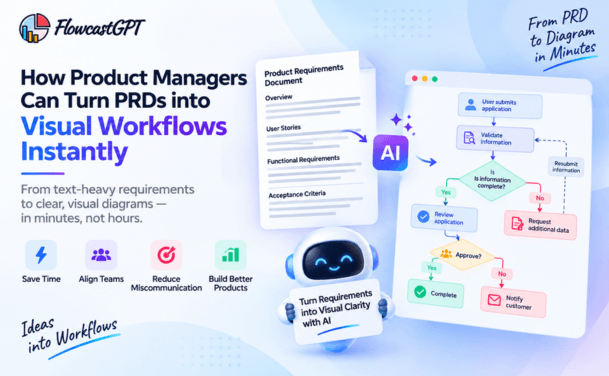
Product managers make important decisions every day. They prioritize features, evaluate customer needs, coordinate with engineering teams, manage dependencies, and decide which product opportunities deserve investment. Yet many of these decisions begin with information scattered across product requirement documents (PRDs), meeting notes, spreadsheets, customer feedback, and technical discussions.
When information is presented only as text, it can be difficult to understand how individual pieces connect. A feature may depend on another feature, a user journey may contain an overlooked step, or a technical limitation may affect the entire product roadmap.
This is where visual thinking for product managers becomes valuable.
By turning complex information into diagrams, workflows, decision trees, and dependency maps, product teams can make relationships easier to understand and discuss. AI-powered diagramming takes this approach further by helping product managers transform written ideas and requirements into visual representations without building every diagram manually.
In this guide, we'll explore how visual thinking supports product management, how AI diagrams improve decision-making, which diagrams are most useful at different stages of product development, and how product managers can incorporate AI diagramming into their everyday workflows.
Read: Why are Product Teams Replacing Manual Diagramming with AI?
Visual thinking is the practice of using spatial, graphical representations to organize, analyze, and communicate complex information. It's not about making slides look nicer. It's about using the brain's natural architecture — its preference for pattern recognition, spatial memory, and visual contrast — as an active tool for reasoning.
Research from the University of Michigan, published in the Strategic Management Journal, identified four specific cognitive functions that visuals improve for strategic decision-making:
Working memory expansion. Human working memory is sharply limited. When you're evaluating multiple product directions or prioritization trade-offs, comparing more than a few options mentally leads to errors. A well-constructed decision matrix or roadmap visualization effectively expands your working memory by offloading the comparison to the diagram — freeing your cognitive capacity for actual judgment.
Long-term memory encoding. Visuals act as mnemonic devices. A two-by-two prioritization matrix or a user journey map is far more likely to be remembered by your team two weeks after a meeting than the meeting notes that supposedly captured the same information.
Pattern recognition. Graphing data, plotting timelines, or mapping user flows makes trends and problems visible in a way that text simply cannot. A spike in customer support tickets is one thing in a report — it's immediately actionable when plotted against a feature release timeline.
Knowledge transfer and co-creation. Perhaps most importantly for product managers: visuals create shared understanding across people with different backgrounds, different vocabularies, and different levels of technical depth. A flowchart showing how a user moves through an onboarding flow means the same thing to an engineer and a customer success manager in a way that a written description rarely does.
The University of Michigan researchers specifically found that visuals with high usability — meaning they make patterns visible without conscious effort — and high malleability — meaning team members can modify and add to them — produce the best decision outcomes. Both of those qualities are exactly what modern AI diagram tools are designed to deliver.
Also read: How Product Managers Can Turn PRDs into Visual Workflows Instantly
Product management involves connecting business objectives, customer needs, technical constraints, and delivery priorities. Visual thinking helps product managers examine these elements together instead of treating each one as an isolated piece of information.
Product requirements can become lengthy, especially when a feature includes multiple user roles, business rules, exceptions, integrations, and dependencies.
A detailed document remains useful for recording specifications, but it may not be the fastest way to understand the complete process.
A diagram can summarize the main steps, decision points, and interactions in a single view. Product managers can then use that visual to guide discussions and refer to the detailed requirements when necessary.
A requirement may appear complete when reviewed in isolation but reveal gaps when represented visually.
For example, a product manager planning a subscription upgrade might discover that the proposed flow explains how a customer selects a new plan but does not address prorated billing, failed payments, cancellation, or confirmation notifications.
Mapping the workflow helps the team ask these questions before development begins.
Product managers regularly work with designers, developers, QA engineers, marketing teams, executives, and customer support.
These stakeholders often need different levels of detail. A developer may need to understand API interactions, while a business stakeholder may want to understand the customer journey and expected outcome.
A well-designed diagram gives everyone a common starting point while allowing discussions to focus on the details relevant to each role.
Product decisions often involve competing priorities. A team might need to choose between launching a smaller feature sooner and delivering a more comprehensive solution later.
A visual comparison can help organize the alternatives, their dependencies, expected benefits, risks, and resource requirements.
The diagram does not make the decision on its own. Instead, it helps the team examine the same factors before agreeing on a direction.
Product decisions are often documented in meeting notes, chat messages, and separate specifications. Over time, it can become difficult to understand why a feature was designed in a particular way.
Maintaining diagrams alongside product documentation gives teams another way to understand workflows, system relationships, and decision logic. When requirements change, the related visual can be reviewed and updated as part of the documentation process.
Check out: How AI Can Automatically Generate Sequence Diagrams from Text
Traditional diagramming can be time-consuming. Product managers may understand what they want to communicate but still need to manually arrange shapes, connect steps, label decision points, and revise the diagram whenever requirements change.
AI-powered diagramming helps reduce this manual effort by converting natural-language descriptions into structured visual representations.
Instead of starting with a blank canvas, a product manager can describe a process, feature, or decision problem and use AI to generate an initial diagram. The team can then review, refine, and validate the result.
Here are six ways this approach can support product decision-making.
Product requirements documents describe what a feature should do, but the intended behavior is not always immediately obvious to every stakeholder.
AI diagramming can help translate written requirements into visual workflows that show:
Example: A product manager is planning a password-reset feature. The written requirement describes entering an email address, receiving a reset link, verifying the link, and creating a new password.
An AI-generated workflow can represent the normal path alongside alternative scenarios, such as an expired link, an unregistered email address, or an unsuccessful reset attempt. The product team can review these paths and identify missing requirements.
The generated diagram should be checked against the original specification before it is treated as an accurate representation.
Feature prioritization is more complicated when one feature depends on another.
For instance, a team may want to introduce personalized product recommendations. However, that capability could depend on event tracking, reliable customer data, consent management, and a recommendation service.
A feature dependency diagram can show these relationships and help product managers assess which work needs to happen first.
AI can assist in creating an initial dependency map from written requirements or planning notes. The team can then verify dependencies, identify bottlenecks, and evaluate whether the proposed sequence is realistic.
This is particularly useful when planning releases, coordinating multiple engineering teams, or deciding which capabilities belong in an initial product launch.
Product managers frequently face decisions with multiple possible outcomes.
Should a new user be offered a free trial or a limited free plan? Should an enterprise customer receive a self-service onboarding experience or guided implementation? Should a feature be available to all users or released gradually?
A decision tree organizes the alternatives and the conditions that influence each outcome.
For example, an onboarding decision tree might branch according to company size, setup complexity, or whether a customer needs integration support.
This structure helps stakeholders identify the assumptions behind each option and discuss what should happen under different conditions.
AI can help draft the branches and decision points from a written scenario. Product managers should still validate the business rules and use actual evidence when estimating outcomes or choosing the preferred option.
Customer feedback often describes individual problems rather than the entire experience. One customer may report difficulty during registration, another may struggle to understand pricing, and a third may abandon checkout.
A customer journey map organizes the experience into stages, such as discovery, evaluation, onboarding, adoption, and renewal. It can include user goals, actions, pain points, touchpoints, and potential improvements.
AI diagramming can help product managers turn interview notes, research summaries, and existing process descriptions into an initial journey map.
The resulting visual can help teams discuss where friction occurs and which improvements deserve further investigation.
However, an AI-generated journey map should not be treated as proof of actual customer behavior. Validate it with user research, product analytics, support data, and other reliable evidence.
Product managers do not need to be software architects to benefit from understanding how a feature interacts with existing systems.
A feature may involve a web application, an API, a CRM, a payment provider, a database, and a notification service. A system interaction diagram can show the major components and how information moves between them.
For example, a product manager planning an automated billing reminder may need to understand how payment status is retrieved, when a reminder is triggered, and how delivery failures are handled.
An AI-generated system diagram can provide a starting point for conversations with engineering teams. Developers and architects should validate technical details, security boundaries, data flows, and system behavior before implementation.
Product launches rarely follow a perfectly predictable path. Dependencies may slip, customer adoption may differ from expectations, or a critical integration may become unavailable.
Scenario diagrams can help product managers organize possible situations, identify decision points, and plan responses.
A launch-readiness diagram, for example, might connect release criteria with monitoring, rollback decisions, customer communication, and post-launch evaluation.
AI can help structure the initial scenarios and reveal questions worth discussing. It should not be relied upon to predict outcomes without appropriate data or to replace risk assessments by the people responsible for the product.
Also check: AI-Powered UML Diagram Generation: Benefits, Challenges & Best Practices
Different product management challenges require different types of diagrams. The best choice depends on the question the team is trying to answer.
| Diagram type | Best use case | Decision it supports |
|---|---|---|
| User flow diagram | Mapping how users complete a task | Which steps or interactions need improvement? |
| Product roadmap | Organizing initiatives and release milestones | What should the team deliver, and when? |
| Feature dependency map | Showing relationships between features | What must be completed first? |
| Decision tree | Mapping choices and possible outcomes | Which option fits a given situation? |
| Customer journey map | Understanding stages of customer interaction | Where should the team reduce friction? |
| Process flowchart | Documenting operational or business workflows | Where can a process be simplified? |
| System architecture diagram | Showing major components and interactions | What systems or integrations could affect delivery? |
| Impact map | Connecting business goals to actors and product changes | Which product changes could contribute to the desired outcome? |
These diagrams are complementary. A roadmap helps communicate delivery plans, while a dependency map helps explain why the plan may need a particular sequence. A user flow describes an interaction, while a system diagram helps explain the technology supporting it.
Let's look at how a product manager could use AI diagramming during common product management activities.
The challenge: A team is preparing to launch a project management application. Stakeholders have requested task assignment, team chat, reporting, integrations, notifications, and AI-generated summaries. The initial release has a limited budget and timeline.
The visual approach: Create a feature relationship map that connects each proposed feature to its user problem, dependencies, and intended outcome.
How it helps: The product manager can distinguish core capabilities from enhancements, identify features that depend on unfinished infrastructure, and discuss trade-offs with stakeholders.
The decision: Select a feasible initial scope based on customer evidence, strategic objectives, technical dependencies, and available resources—not simply on the number of features requested.
The challenge: New users create an account but do not consistently complete setup.
The visual approach: Map the onboarding flow from registration to the first successful use of the product. Include key steps, decision points, errors, and exit paths.
How it helps: The team can review where users may encounter unnecessary steps, unclear instructions, or technical obstacles.
The decision: Identify potential improvements to test, then evaluate their impact using completion rates, time to first value, user feedback, and other relevant metrics.
The challenge: A requested feature requires the product to exchange information with an external CRM system.
The visual approach: Create a system interaction diagram showing the user action, application, integration API, CRM, data returned, and relevant failure paths.
How it helps: The product manager can discuss data ownership, dependencies, permissions, error handling, and the expected user experience with engineering and security teams.
The decision: Agree on a realistic scope, identify technical questions that need investigation, and establish acceptance criteria before committing to a delivery plan.
The challenge: Leadership is considering two initiatives: improving activation for existing users or adding a new premium feature.
The visual approach: Create a decision framework that compares the initiatives by strategic alignment, customer evidence, expected impact, effort, risk, and dependencies.
How it helps: Stakeholders can see where the options differ and which assumptions need further validation.
The decision: Prioritize the initiative that best supports the product's current objectives, using available evidence and explicitly acknowledging uncertainty.
Check: Best AI Diagram Generator for Technical Documentation in 2026
Traditional diagramming tools are powerful, but they require the person creating the diagram to already know what they want to show and to spend significant time building it manually. The diagram creation process itself is a separate workflow from the thinking and decision-making process.
AI-powered diagram tools close that gap. Instead of switching contexts to build a diagram, a product manager can describe what they're thinking — "map the user flow for account creation including the email verification edge case" — and get a working diagram back in seconds. The diagram becomes part of the thinking process, not a documentation artifact produced after the thinking is done.
This matters for three specific reasons:
Speed of iteration. When updating a diagram takes seconds rather than twenty minutes, teams are far more willing to refine visuals in real time during a meeting — which means the visual stays current and relevant rather than becoming outdated the moment the conversation moves on.
Lower barrier to entry. Not every product manager has advanced diagramming skills. AI generation means that the quality of the visual output is no longer limited by the creator's comfort with complex diagramming tools.
Consistency across the team. When diagrams are generated with consistent conventions — consistent shapes, consistent notation, consistent levels of detail — they're easier to read and compare across projects. AI generation helps enforce that consistency in a way that manual diagramming across a team rarely does.
To make this concrete, consider what a product manager's day might look like when visual thinking and AI diagram generation are embedded in their workflow:
A roadmap review meeting is scheduled for 10am. With AI diagram generation, the PM spends 15 minutes describing the current state of priorities to the tool and getting an updated roadmap visual — instead of 90 minutes reformatting a spreadsheet, rebuilding a slide deck, and trying to make a text-based update readable for a mixed audience.
A feature scope session with two engineers. Instead of presenting a written spec and waiting for questions, the PM generates a user flow diagram during the conversation — updating it in real time as the engineers raise edge cases and exception paths. The meeting ends with a shared, agreed-upon visual artifact that both sides helped build, rather than a doc that one side wrote and the other side needs to review.
A quarterly prioritization review. Instead of defending a ranked list, the PM presents a visual priority matrix with features plotted by business impact and implementation complexity. The conversation immediately focuses on the trade-offs visible in the diagram — not on relitigating which features matter more.
The retro identified a handoff problem between product and engineering. The PM generates a process flow diagram showing the current handoff process and a proposed improvement. This goes into the team's shared workspace as a concrete proposal for the next sprint — not a bullet point in a Confluence page that no one revisits.
Visual thinking is a skill that compounds over time — the more consistently you use visual frameworks, the more naturally you reach for them in high-stakes situations. Here's a practical progression for product managers who want to develop this capability:
Start with one high-stakes artifact. Pick one recurring deliverable — your quarterly roadmap, your sprint planning artifact, or your stakeholder update — and commit to making it visual. Use an AI diagram tool to generate the first version, then refine based on feedback. Notice how the conversation changes.
Build a personal library of diagram templates. Over time, identify the three or four diagram types you use most often and build prompts or templates that let you generate them quickly with your specific context. The goal is reducing the friction between "I need to communicate this decision" and "here is a visual that communicates it clearly."
Use diagrams as thinking tools, not just communication tools. The biggest shift in visual thinking is using diagrams during the thinking process, not just to explain conclusions after the fact. Before you write a spec, sketch the user flow. Before you prioritize a backlog, map the dependencies. The diagram often reveals things the text would have missed.
Make diagrams collaborative by default. Share draft diagrams with engineering, design, and stakeholder teams before decisions are made — not as finished deliverables, but as working surfaces. The discussions that happen around a malleable visual diagram are qualitatively different from the discussions that happen around a fixed document.
Measure the outcomes. Track whether meetings with visual artifacts produce decisions faster than meetings without them. Track whether feature builds that started from a flow diagram have fewer scope creep incidents than those that didn't. The evidence will reinforce the practice.
Read: FlowcastGPT New Features - Generate Process Documents & Code Scaffolding with AI Capabilities
FlowcastGPT is an AI-powered platform designed to transform text and natural-language descriptions into diagrams and other visual representations. This can be useful for product managers who need to move from written ideas to a visual model without manually constructing every element.
A practical workflow can look like this:
Begin with the decision or problem you want to understand.
For example:
A clearly defined question helps keep the diagram focused.
Write a short description of the feature, process, or decision. Include the important steps, actors, rules, dependencies, and exceptions you already know.
For example, you might describe a subscription cancellation process, including the customer's actions, confirmation steps, access changes, billing implications, and notification requirements.
Avoid including sensitive customer information or confidential business data unless your organization's policies and the tool's applicable privacy and security terms permit it.
Use FlowcastGPT to turn the description into a visual representation. The initial output can help you move from a text-heavy explanation to a structure that stakeholders can inspect and discuss.
Depending on the task, this might be a workflow, flowchart, process map, or system diagram.
AI-generated diagrams are starting points, not authoritative product specifications.
Ask relevant stakeholders to review the visual:
Revise the diagram to reflect confirmed decisions and unresolved questions. Update the associated PRD, acceptance criteria, technical notes, or implementation plan as appropriate.
When a requirement changes, review the related diagram and documentation together to reduce the risk of inconsistencies.
Use the visual as a shared reference during planning meetings, design reviews, backlog refinement, and stakeholder discussions. FlowcastGPT supports sharing diagrams through links, helping teams review visual information across locations and roles.
The goal is not to replace written documentation. It is to make that documentation easier to understand and act on.
AI diagramming can save manual effort, but the quality of the result depends on the information provided and the team's review process.
Do not create a diagram simply because a process can be visualized. Identify the question it should answer.
A dependency map designed for release planning may need different information from a workflow designed to explain the customer experience.
Trying to represent an entire product in one diagram can make it difficult to read.
Start with the main flow, then create separate diagrams for complex integrations, exceptions, or technical details. Use labels consistently and avoid unnecessary branches.
AI may generate plausible steps or relationships that were not explicitly included in the source material.
Mark unconfirmed assumptions and ask the responsible stakeholders to validate them. This is especially important when diagrams influence scope, timelines, security, or architecture decisions.
A customer journey map does not establish how customers actually behave. A prioritization diagram does not prove which feature will generate the highest return.
Use customer interviews, analytics, support tickets, experiments, financial estimates, and engineering assessments to support important decisions.
Assign responsibility for keeping important diagrams current. When product requirements, integrations, or business rules change, update the related visual and review its consistency with the source documentation.
Before entering product information into an AI tool, check the organization's data-handling requirements. Remove unnecessary personal information, protect confidential technical details, and use approved tools and access controls.
Visual thinking is most effective when diagrams support clear reasoning rather than replace it.
Using diagrams without a specific purpose: A visually appealing diagram may still be unhelpful if it does not answer a product question.
Treating AI-generated output as automatically correct: Verify steps, dependencies, labels, technical details, and business rules against the source requirements.
Overloading the diagram: Too many nodes, colors, and branches can make the visual harder to interpret than the original text.
Ignoring quantitative evidence: Diagrams can explain relationships and scenarios, but prioritization and investment decisions may also require metrics, estimates, and research.
Failing to update documentation: An outdated diagram can create confusion if the product changes but its visual representation does not.
Excluding the people who will use the result: Involve relevant stakeholders early so that the diagram reflects different perspectives and supports shared understanding.
Read: Creating SOPs Faster Using AI-Generated Flowcharts
Product teams should evaluate AI diagramming by whether it improves their work—not simply by how quickly a visual can be generated.
Possible indicators include:
Establish a baseline before introducing a new workflow and compare results over time. Not every improvement can be attributed to diagramming alone, so consider other changes that may influence the results.
As AI-powered tools become more capable of transforming natural-language descriptions into structured outputs, visual thinking can become a more accessible part of everyday product work.
Product managers may be able to move more easily from meeting notes to workflow drafts, from requirements to dependency maps, and from process descriptions to documentation that stakeholders can review.
The most valuable outcome is not simply faster diagram creation. It is reducing the effort required to make ideas understandable, expose assumptions, explore alternatives, and communicate decisions.
AI can help create and refine the visual representation, while product managers remain responsible for understanding customer needs, validating assumptions, weighing trade-offs, and deciding what to build.
This combination of human judgment and AI-assisted visualization can help product teams make their reasoning more explicit and their collaboration more effective.
Visual thinking gives product managers a practical way to examine complex requirements, understand dependencies, communicate with cross-functional teams, and evaluate different product options.
AI-powered diagramming makes the process more accessible by helping turn written ideas into visual workflows, decision trees, customer journeys, and system maps. When these visuals are reviewed against real requirements and supporting evidence, they can improve the quality of product discussions and help teams identify issues earlier.
For product managers who want to spend less time manually constructing diagrams and more time evaluating product decisions, AI diagramming offers a useful addition to the product management toolkit.
Ready to turn product ideas into clear visuals? Explore FlowcastGPT to transform natural-language descriptions into diagrams and workflows that your team can review, refine, and share.
Visual thinking in product management is the practice of using diagrams, maps, flowcharts, and other visual representations to understand requirements, explore relationships, communicate ideas, and support product decisions.
AI diagrams can help product managers organize complex information, identify potential gaps, explore alternatives, and communicate dependencies. They support better-informed discussions, but important decisions still require validated requirements, stakeholder input, and relevant evidence.
Commonly useful diagrams include user flows, product roadmaps, feature dependency maps, decision trees, customer journey maps, process flowcharts, system architecture diagrams, and impact maps. The right choice depends on the question the team needs to answer.
AI-powered diagramming tools can help transform text from product requirements and process descriptions into initial visual representations. Product managers should review the generated diagrams to confirm that they accurately reflect the requirements and include relevant exceptions.
Feature dependency maps and visual decision frameworks can help teams examine dependencies, risks, effort, and strategic alignment. These visuals organize the discussion, while final priorities should be based on customer evidence, business goals, and delivery constraints.
No. Diagrams complement PRDs rather than replace them. A PRD can capture detailed requirements, constraints, acceptance criteria, and business rules, while a diagram makes selected relationships and processes easier to understand.
Product managers can use AI-generated diagrams during backlog refinement, sprint planning, design reviews, technical discussions, and release planning. The diagrams help clarify workflows and dependencies before the team commits to implementation.
FlowcastGPT is an AI-powered diagramming platform that converts natural-language descriptions into visual representations such as diagrams and flowcharts. Product managers can use it to visualize requirements, map processes, explain system relationships, and create shareable visuals for team discussions.