Standard Operating Procedures (SOPs) are the backbone of every successful organization. They ensure consistency, improve operational efficiency, simplify employee onboarding, and reduce errors across business processes. However, creating detailed SOPs has traditionally been a time-consuming task that involves documenting workflows, interviewing stakeholders, and manually designing flowcharts.
Today, Artificial Intelligence (AI) is transforming this process.
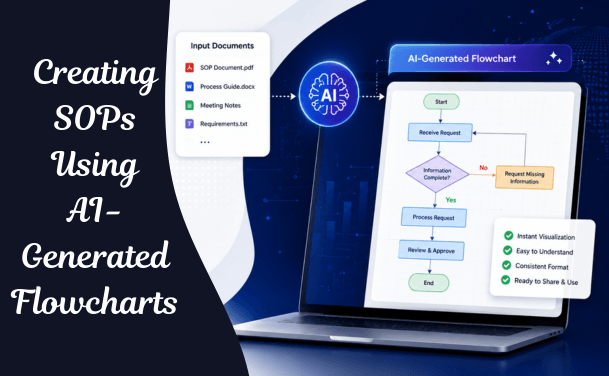
AI-generated flowcharts enable businesses to convert process documents, meeting notes, requirement specifications, and existing SOPs into visual workflows within minutes. Instead of spending days creating diagrams manually, teams can focus on refining processes and improving operational excellence.
Writing SOPs from scratch takes time and effort, as it involves capturing every step and ensuring teams follow the correct procedures. This manual approach leads to inconsistent documentation, missed critical details, and team misalignment.
The flowchart — the visual representation of the procedure's steps, decisions, and outcomes — has always been the most valuable component of a good SOP and the most consistently skipped one. Text-heavy documents can be difficult to follow, but flowcharts are extremely helpful in communicating and training people on standard operating procedures. However, they are time-consuming to create and maintain. In the past, to make a flowchart, you'd need to manually create process shapes, drag-and-drop arrows across the process shapes, and label and color-code everything for hours on end.
That "hours on end" is exactly what AI eliminates. This guide explains how AI-generated flowcharts have transformed SOP creation — from the underlying mechanics of how these tools work, to the specific platforms leading the category, to a complete practical workflow your team can implement this week.
As organizations grow, maintaining consistency becomes increasingly challenging.
Without standardized procedures, businesses often experience:
Well-designed SOPs help organizations standardize operations while improving productivity and quality.
Read: AI Workflow Visualization for Digital Transformation Projects - Complete Guide
A well-structured SOP defines the objective of a task, outlines its scope, assigns roles and responsibilities, and describes each step in the process. Among the core components — purpose, scope, roles and responsibilities, process sequences — the visual aid layer is what makes the other components actually usable under real working conditions.
A text-only SOP requires the reader to hold the entire procedure's logic in their head while reading linearly through paragraphs. A flowchart externalizes that logic — showing the decision points, the branches, the exception paths, and the sequence simultaneously, in a form that can be scanned rather than read start to finish. For training new employees, for quick reference during execution, and for spotting gaps or redundancies during process review, the visual format consistently outperforms text.
Despite their value, flowcharts are the SOP component most likely to be cut when time is short. The traditional flowchart creation process required: opening a diagramming tool, manually placing shapes for each step, manually drawing and routing connector arrows, manually labeling decision branches, and manually applying consistent color coding and formatting — all before the actual content of the procedure was even validated as correct.
For a process owner already stretched across operational responsibilities, this overhead routinely meant the flowchart was the first thing cut from the SOP — leaving teams with the text-only document that is hardest to use and easiest to misread.
Common SOP mistakes include using complicated language, describing too many actions in one step, not following a consistent, legible format, and not updating the document when tasks and processes change.
Every one of these common mistakes is, at its root, a symptom of the missing visual layer. Complicated language persists because there is no diagram forcing the author to express the logic simply enough to draw. Steps get bundled together because there is no flowchart box structure enforcing one discrete action per step. Documents go stale because updating a paragraph is easier than updating a diagram — so when a diagram does not exist, at least there is nothing visual to fall out of sync.
AI-generated flowcharts automatically convert structured and unstructured business information into visual process diagrams.
Instead of manually drawing workflows, users simply upload:
AI analyzes the content and creates professional flowcharts that accurately represent the workflow.
Also read: How to Convert Requirements Documents into Visual Diagrams Using AI
AI is fundamentally changing how we approach process documentation. An AI SOP generator uses machine learning to draft complete documents from brief descriptions or even recorded workflows, turning hours of work into minutes.
The mechanism varies by tool category, but the core capability is consistent: instead of manually placing every shape and connector, the user provides input in a format that requires far less effort — a plain-language description, a bulleted list of steps, a meeting transcript, or even a screen recording — and the AI tool interprets that input to generate a complete, structured flowchart automatically.
Text-to-flowchart generation: The user describes the process in natural language — "when a customer submits a refund request, support checks the order date; if within 30 days, auto-approve; if beyond 30 days, escalate to a manager for review" — and the AI tool produces a structured flowchart with correctly placed decision diamonds, labeled branches, and process boxes. This is the fastest method when the process is already well understood and just needs to be visualized.
Screen-recording-to-flowchart generation: Tools in this category capture screenshots automatically as you work through the process, identify the steps you're taking, and generate clear, structured documentation in real-time. Instead of describing what you do, these tools watch you do it. This is the fastest method when the process involves software navigation that would be tedious to describe in words but is fast to simply perform once while recording.
Document-to-flowchart conversion: For organizations with existing SOPs that were written as text but never visualized, AI tools can transform an SOP document into a flow chart directly — parsing the existing written procedure and generating the corresponding visual diagram without requiring the process to be re-described from scratch.
These systems can analyze your input and structure it according to best practices, ensuring your SOPs are clear, consistent, and easy to follow — automatically drafting procedures from simple text prompts, generating step-by-step guides from screen recordings, suggesting improvements for clarity and grammar, and automating the structuring and formatting of documents.
For the flowchart layer specifically, this means the AI tool is making a series of structural decisions that previously required manual judgment: where does this process step deserve its own box versus being merged with an adjacent step, where is a genuine decision point requiring a diamond shape versus a simple sequential step, what are all the outcomes of each decision and do they all lead somewhere, and how should the overall flow be laid out for maximum readability.
Despite their importance, creating SOPs is often tedious.
Most organizations rely on:
This process requires multiple revisions and significant collaboration between business users, process owners, and documentation teams.
Common challenges include:
Check out: AI Flowchart Generator for Software Development Teams: A Complete Guide
Visual SOPs help new employees understand business processes more quickly.
Learning becomes easier when employees can see how processes work instead of reading lengthy documentation.
AI-generated flowcharts ensure every department documents processes consistently.
This improves operational alignment.
Visual workflows make it easier to identify:
Organizations can optimize processes before documenting them.
Industries such as healthcare, finance, insurance, and manufacturing require documented operating procedures.
Visual SOPs improve audit readiness and regulatory compliance.
AI-generated flowcharts create a centralized knowledge repository that employees can easily understand and maintain.
Modern AI workflow visualization platforms typically follow these steps:
Upload:
Natural Language Processing (NLP) identifies:
AI automatically creates professional workflow diagrams.
Business users validate workflows and update process details where necessary.
Export diagrams into documentation platforms, training materials, knowledge bases, or process repositories.
Also check: AI Diagram Generator: The Complete Guide for Teams and Enterprises
AI suggestions speed up drafting, but they should never replace human judgment. Always review and tailor content to reflect your organization's specific operations, culture, and compliance needs. An AI-generated flowchart that has not been validated by someone who actually performs the procedure can encode plausible-sounding but incorrect process logic.
Relying only on generic AI-generated steps can result in SOPs that are too broad. Customize templates to include your team's unique processes and compliance requirements. A flowchart generated from a brief, generic description will reflect that brevity — the more specific and detailed the input, the more useful and accurate the generated output.
Even the best AI-assisted SOPs won't help if teams don't know how to use them. Provide guidance, walkthroughs, or training to ensure adoption. The speed gain from AI flowchart generation only translates to organizational value if the resulting SOPs are actually integrated into how the team works — not filed away and forgotten.
AI-generated SOPs can quickly become stale if user input isn't considered. The genuine advantage of AI flowchart generation is not just the speed of the first draft — it is the dramatically lower cost of revision, which makes it practical to keep SOPs current as processes evolve rather than letting documentation drift out of sync with reality.
Using a text-description tool for a complex, multi-screen software procedure (when a screen-recording tool would capture it more accurately and faster) or using a screen-recording tool for a procedure that is primarily decision-logic with little screen interaction (when a text-to-flowchart tool would be faster) both produce more friction than necessary. Match the capture method to the nature of the process.
Onboarding and Training Documentation
New hires can learn processes faster when SOPs include clear visual guidance rather than dense text alone. AI-generated flowcharts make it practical to maintain comprehensive onboarding documentation across every role and process — a level of documentation completeness that was rarely achievable when each flowchart required hours of manual creation.
Compliance and Audit-Ready Documentation
Protecting your business processes and ensuring documentation integrity is non-negotiable, especially for large enterprises or those in regulated industries. AI-generated flowcharts, paired with proper version control, create the auditable, current documentation that compliance frameworks require — without the documentation backlog that manual creation methods routinely produce.
Knowledge Capture Before Departures
By recording detailed conversations with a departing team member and processing them through AI, organizations can quickly generate structured, comprehensive SOPs that capture institutional knowledge that would otherwise leave with the employee — turning what was previously an informal handover conversation into permanent, visual process documentation.
Cross-Functional Process Documentation
For SOPs spanning multiple departments or roles, swimlane-style AI-generated flowcharts make handoffs and accountability visible in a way that text-only documentation cannot achieve — showing exactly which team is responsible for each stage of a cross-functional process, reducing the ambiguity that causes process breakdowns at departmental boundaries.
Standardizing Inconsistent Processes Across Locations or Teams
Organizations with multiple locations or teams performing similar processes inconsistently can use AI flowchart generation to rapidly document the current state across each variant, compare them visually, and converge on a single standardized procedure — work that would require significant manual diagramming effort to attempt at the same speed.
Manufacturing
Document production processes, quality inspections, maintenance procedures, and safety workflows.
Healthcare
Create SOPs for patient care, admissions, discharge planning, compliance, and clinical operations.
Financial Services
Visualize loan processing, KYC verification, customer onboarding, approvals, and compliance workflows.
IT Operations
Document incident management, software deployment, DevOps processes, infrastructure management, and support procedures.
Human Resources
Generate onboarding workflows, recruitment processes, leave approvals, employee lifecycle management, and performance reviews.
Check: Integrating AI Diagramming Tools into Your Existing Design Stack
To maximize AI-generated SOP quality:
AI accelerates documentation, but human expertise ensures business accuracy.
Organizations are increasingly embracing:
AI-generated flowcharts fit naturally into these initiatives by making documentation faster, smarter, and easier to maintain.
Rather than replacing documentation specialists, AI enables them to focus on improving processes instead of creating diagrams manually.
Creating SOPs doesn't have to be a manual, time-consuming process.
FlowcastGPT helps organizations convert requirement documents, meeting notes, process descriptions, and existing SOPs into professional AI-generated flowcharts within minutes. By automating workflow visualization, teams can standardize documentation, improve collaboration, accelerate employee onboarding, and support digital transformation initiatives with greater efficiency.
Creating Standard Operating Procedures has traditionally been one of the most labor-intensive documentation tasks within an organization.
AI-generated flowcharts are changing that.
By automatically converting business documentation into visual workflows, AI helps organizations create SOPs faster, improve collaboration, simplify training, and optimize business processes.
As AI-powered workflow visualization continues to evolve, businesses that adopt these tools will spend less time documenting processes and more time improving them.